| WIP: coming soon
To deploy a model on a single node, there are two available templates, based on your hardware, in the Job page:
- For CPU (amd64 and arm64): llama.cpp
- For GPU (NVIDIA and AMD): llama.cpp, vLLM
CPU-only
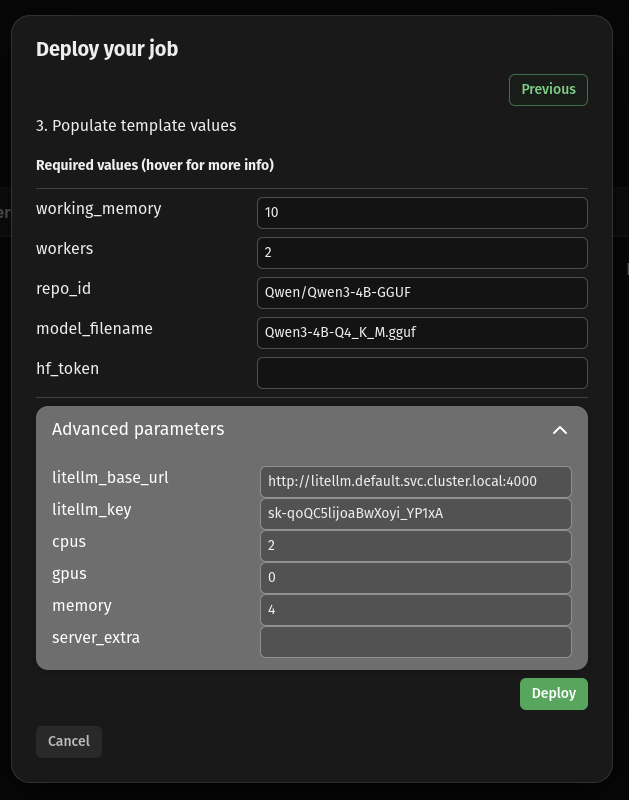
You can deploy a model by navigating to the Jobs page and clicking the circle-plus button. Select llamacpp as model template.
working_memory: 10 (enough free space GBs to fit the model weights)workers: 1repo_id: Qwen/Qwen3-4B-GGUF (the repo id from Huggingface)quant: Q4_K_M (the quantization version we want)hf_token:if using a gated model (in this case it's not needed) litellm_key: sk-qoQC5lijoaBwXoyi_YP1xA (Advanced parameter; the virtual key generated above for LiteLLM. This is key to make sure models are self registering to LiteLLM gateway.)
GPU-only
Multi node
Deploying across multiple devices, you can use any of the available templates for model deployment, and configure it to use more than one worker. This could be to use GPUs on multiple devices, or to increase the memory pool available by distributing the weight load across.
Using the model
Templates deploy an OpenAI-compatible API service that can be used to interact with the deployed models. See our inference section for example code snippets on various model modalities.